Admission Details (ensure name, address and NOK details are accurate)
Observations, Measurements and Near Patient tests (record height and weight here)
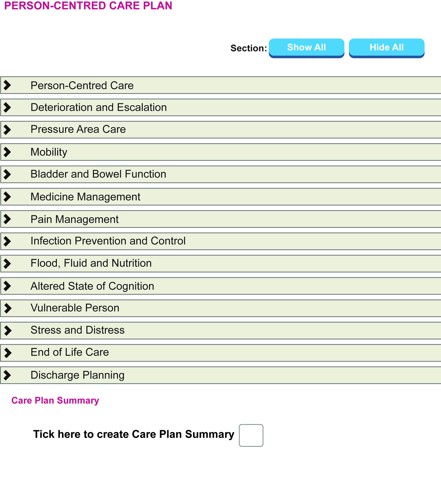
Person Centred Care Plan (PCCP) (complete all risk assessment questionnaires as you go through the care plan)
Adult Personal Care and Social Enquiry.
Complete the following risk assessments found within the PCCP:
4AT
*Additional risks (name band, allergies)
Bladder and bowel
*Falls
Mobility
Oral hygiene
MRSA
*MUST
Nutritional profile
*Waterlow
PVC and/or indwelling catheter if applicable.
*must be completed within 6 hours of admission to the ward
Nursing admission documentation how-to
To create a nursing admission
Step 1. Select Patient on the Ward Floor Plan and choose EPR.
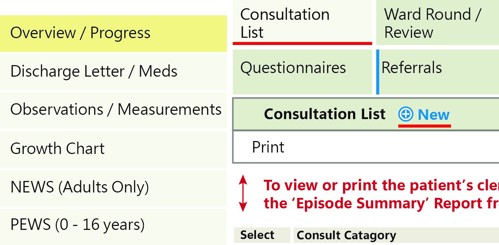
Step 2. From the Overview/Progress tab, choose Consultation List tab and click New.
Step 3. Enter password and click update.
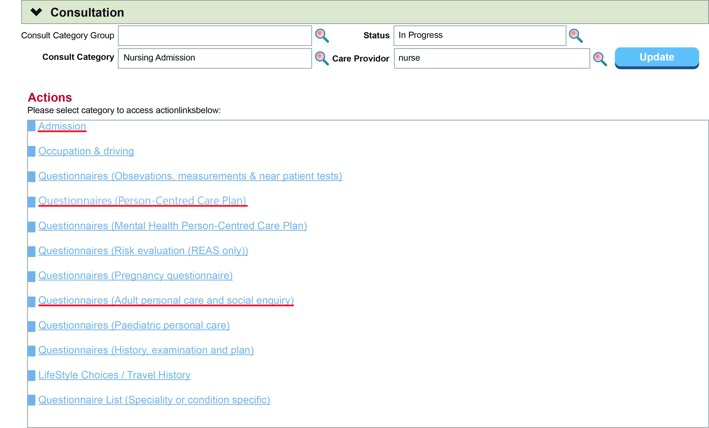
Step 4. From Category choose Nursing Admission (N), Care Provider choose Nurse (N).
Step 5. Untick the checkbox on the right hand side to show all previously completed questionnaires.
Step 6. Complete the following questionnaires on the left hand side:
Admission Details - ensure name, address and NOK details are accurate.
Observations, Measurements and Near Patient tests – record height and weight plus any other applicable tests or measurements. It’s important to do this before the PCCP so that the height/weight/BMI can pre-populate into the risk assessments e.g., MUST, Waterlow.
Person Centred Care Plan (PCCP) (including top boxes!) - complete all of the risk assessment questionnaires as you go through (list below).
Adult Personal Care and Social Enquiry - this helps figure out the level of assistance the patient requires and also highlights issues for discharge planning.
Required Risk Assessments –
4AT
Additional risks (name band, allergies)
Bladder and bowel
Falls
Mobility
Oral hygiene
MRSA
MUST
Nutritional profile
Waterlow
(Others may also be applicable e.g., Pain, PVC or indwelling catheter).
Step 7. To save full Nursing Admission, click update.
How to discharge a patient (and record that a patient has died)
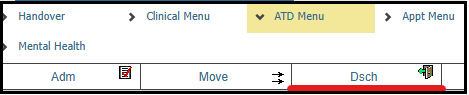
Step 1. Select Patient on the Ward floor plan and choose ATD Menu then Dsch.
Step 2. Click update.
Step 3.
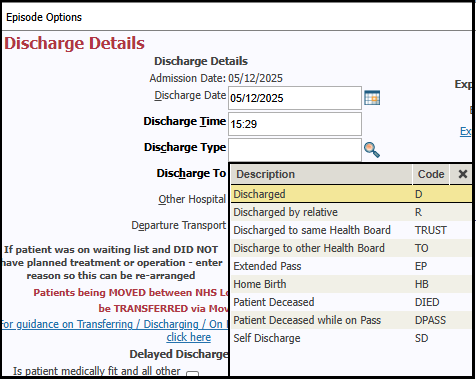
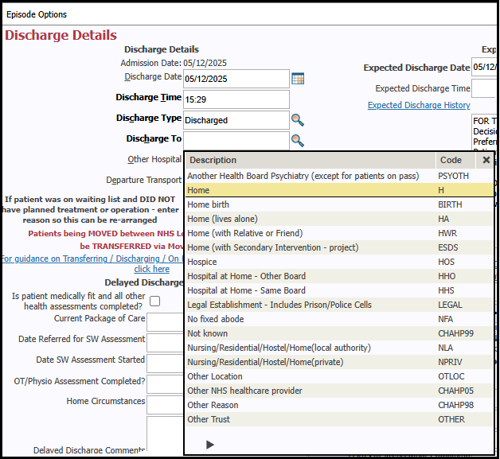
Input Discharge Date
Shortcut: t=todays date
Input Discharge Time
Shortcut: n=the time now
Step 4.
Input Discharge Type
Shortcut: d=discharged
Step 5. Input Discharge To. Click on the magnifying glass for options e.g., H=home.
Step 6. Click update.
To record on TRACK that a patient has died, on Discharge Type and Discharge To, input shortcut died then update as you would normally when discharging a patient.
Updating risk assessments
The outcome of the risk assessments determines the frequency at which they need to be reviewed/updated. Eg. Waterlow score of over 15 should be reviewed daily, and 10-15 should be reviewed every 3 days. TRAK will pre-populate the appropriate date in the review box.
Look out for the red hourglass icon on the ward floorplan which indicates if a risk assessment is outstanding or due to be updated.
To update risk assessments:
Click on the hourglass icon in the patient’s bedspace.
Type your login details in the boxes and Update.
Scroll down to the list of risk assessments and select the one(s) that require updating.
OR
Update using the links within the Person Centred Care Plan (PCCP).
PCCP must be filled in for all patients.
Guidance
How to start a Person-Centred Care Plan
Care planning is a conversation between the person and the healthcare practitioner about the impact their condition has on their life, and how they can be supported to best meet their health and wellbeing needs in a whole-life way. It is a part of the nursing process to establish a relationship with the patient and identify details of preferences and / or goals. The care plan is owned by the individual and shared with others with their consent. It is important that when a discussion takes place, there is a record of it, and people know they have a plan.
Goal (Patient)
It is important that if the patient has identified goals for the specific aspect of the care that these are documented here in a person-centred way. This section gives you an opportunity to get to understand what is important to your patient.
How do you ask your patient what their goal is?
Think about "What matter to you" conversations.
What's important to you at this moment?
What are some of the things you would like to achieve as a result of this support or from being in hospital?
When you have a good day, what are the things that make it good?
Have you considered the spiritual care needs of your patient? (Spiritual care can help a person reconnect with what really matters to them)
Does your patient have beliefs or values which are important / affect them currently? (A person's beliefs and values may support or challenge them at time of illness and may influence how they think about aspects of their care e.g., attitude to taking medication, dietary requirements, bereavements or at end of life.)
CAU elective patients
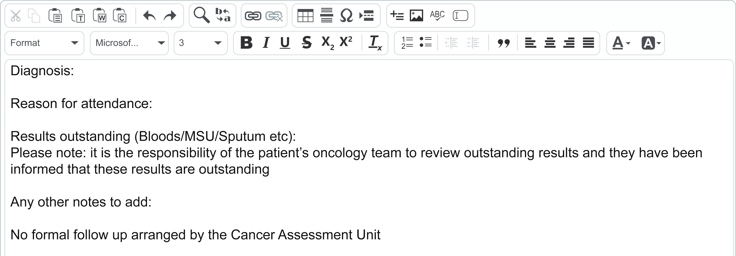
For all elective patients attending CAU, record their attendance details by writing an inpatient discharge summary in the Discharge Letter/Meds section on TRAK by using \eccacd. [This includes patients attending for pre SACT blood tests and pump disconnects] No other documentation is required.
How?
Highlight patient
Click EPR
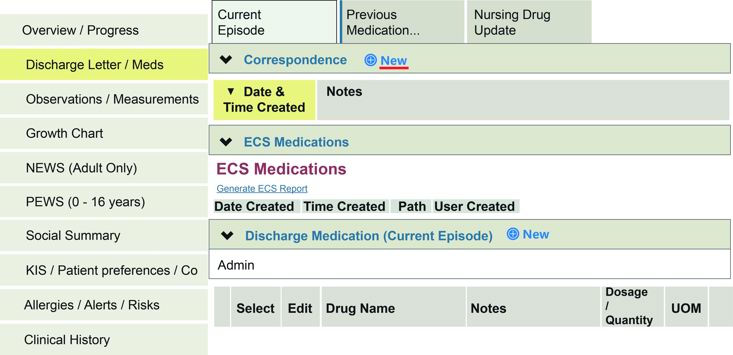
Discharge Letter/Meds (on left hand side)
Correspondence - New
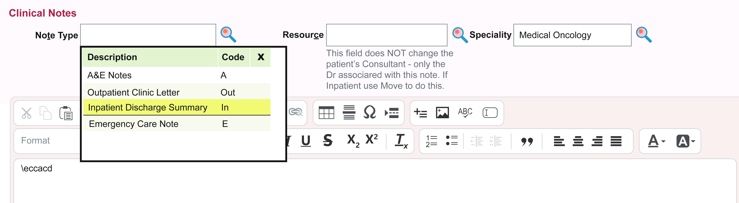
Note Type – Click magnifying glass, on drop down menu select Inpatient Discharge summary. Enter: \eccacd (then press the space bar).
Headings will appear which need completed. The entry below should not be changed only added to:
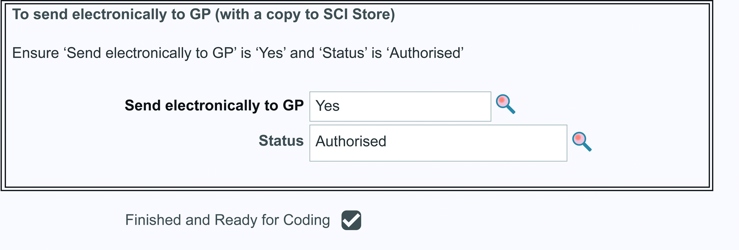
Once you have completed it, scroll down to: Send electronically to GP - Yes Change Status to authorised Tick Finished and Ready for Coding
TRAK shortcuts
To use the following shortcuts whilst writing notes on TRAK, type required shortcut then press space bar.
Please note that the table below may need to be scrolled horizontally or vertically in order to view all information, depending on your device.
Shortcut
When to use
Headings
\eccacd
For patients attending CAU as an elective patient, notes should be entered in a discharge note – for more detailed instructions please see CAU Elective Patients.
Diagnosis:
Reason for attendance:
Results outstanding (Bloods/MSU/Sputum etc):
Any other notes to add:
\opt
For patients who are being reviewed post stem cell transplant.
Phone review / Physical review: (amend to note which)


 Edinburgh Cancer Centre new nurse handbook