Warning

This is a quick guide to show how to check when drugs were administered.

Checking Administration for Regular Prescriptions

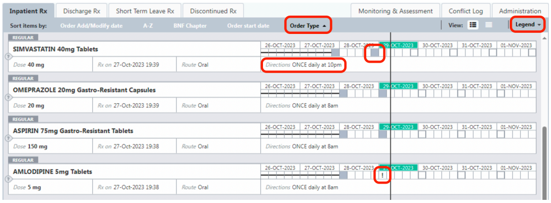
On the Inpatient Rx tab, you can check when administration last occurred. Click on Order Type to sort by Regular, then PRN, then STAT. Clicking on it again will sort it the opposite way.

The boxes indicate five time periods for each day. The text underneath the boxes indicates the time(s) when drugs are prescribed.

These are the meaning of some common symbols:

  • Grey filled box – the drug was given.
  • Grey outlined box – when the drug is to be given in the future.
  • Horizontal line – prescription not active at this time.
  • Exclamation mark – drug not given.

Hovering over the Legend text shows the meaning of all symbols.
HEPMA Screenshot

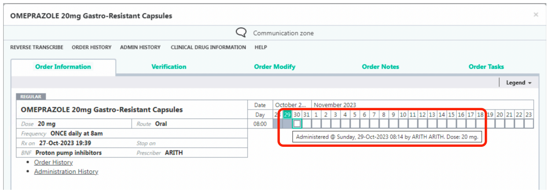
To see the precise time that a drug was given, click on the drug on the Inpatient Rx screen and hover the mouse pointer over the grey box.
HEPMA screenshot

Regular Drugs in an Either/Or Protocol

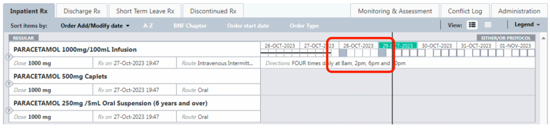
For drugs in an Either/Or Protocol, the administrations of the most recently administered preparation are shown, in the example below, IV Paracetamol was given most recently.
HEPMA screenshot

Hovering over the other preparations will show then they were administered, showing that the patient did get four doses on the previous day.

HEPMA screenshot

To see the full administration details and exact times of administration, click on the drug and then Admin History or Administration History.
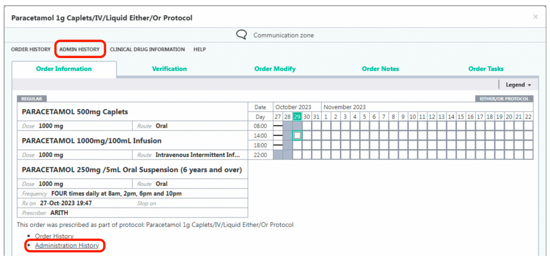
HEPMA screenshot

The Administration History screen below shows that Paracetamol 1000mg/100mL infusion was given at 08:14 for the scheduled administration of 08:00. For the caplets and oral suspension preparation, they have the same time but are noted in the Non-Administration Reason column as Alternative administered.
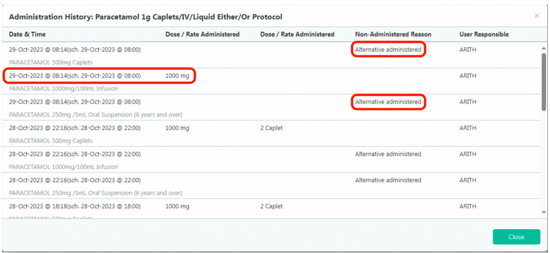
HEPMA screenshot

Checking Administration for PRN Prescriptions

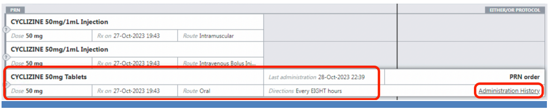
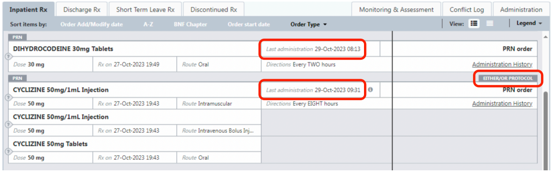
On the Inpatient Rx tab, the last administration for PRN drugs is shown as below.

For drugs that are prescribed as an Either/Or Protocol, the most recent administration of any preparation is shown. In the example below, Cyclizine by injection was most recently administered.

HEPMA screenshot

Hovering the mouse pointer over the tablet preparation will show when that was last given.

HEPMA screenshot

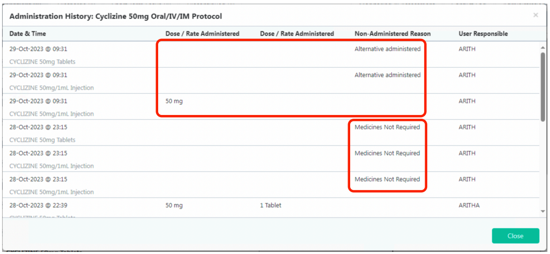
Clicking on Administration History will show all administrations of all preparations. The example below shows that Cyclizine 50mg/1mL Injection was administered, and the tablets were not.

HEPMA Sscreenshot

Hover the mouse pointer over the drug administered to see the route of administration.

HEPMA screenshot

Checking Administration for STAT Prescriptions

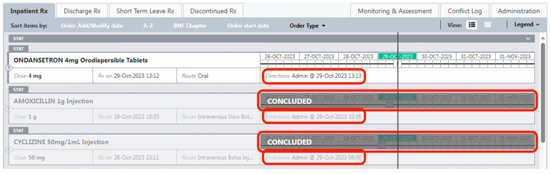
On the Inpatient Rx tab, STAT doses that have not been administered will show with the time that they are prescribed for.

STAT doses that have been administered will show as CONCLUDED.

The time when they should have been given is shown, e.g., for Amoxicillin below it was prescribed for 29-Oct-2023 10:36.

To see when the dose was actually given, click on the drug.

HEPMA screenshot

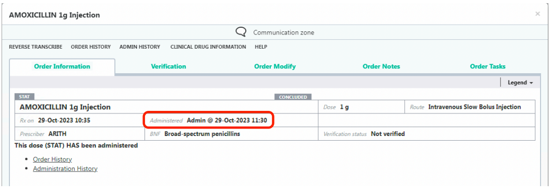
Hover the mouse pointer over the drug prescription to hide the grey CONCLUDED box.

The Administered time will be visible, e.g., for Amoxicillin below, it was administered at 29-Oct-2023 11:30.

HEPMA screenshot

Discontinued or Concluded Prescriptions

When a prescription has been discontinued or it has concluded, it will stay greyed out on the Inpatient Rx tab until midnight.

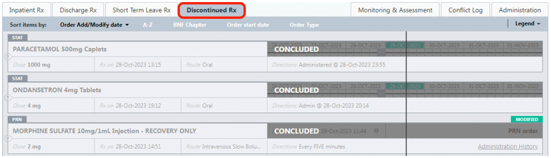
Prescriptions that were discontinued or concluded before midnight are visible on the Discontinued Rx tab.

HEPMA screenshot

More Information and Videos

More detail on administration can be found on the Medicines Administration within HEPMA section on the NoS HEPMA site.

HEPMA admin QR code

abdnanaes.org/HEPMA-Admin

Editorial Information

Last reviewed: 01/12/2023

Next review date: 01/12/2026

Reviewer name(s): Calum McDonald.