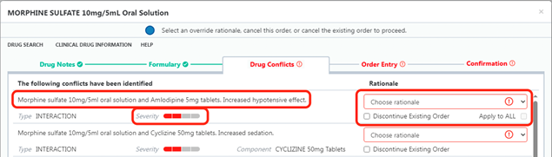
By choosing a start time in the future
You prescribe a Regular drug but also give a STAT dose and then want to miss out one of the regular doses.
For example, you want to prescribe regular Paracetamol at 0800, 1400, 1800 and 2200 but have given a dose IV at 1530 and want to miss out the 1800 dose.
If it is a new prescription, you can change the Start on time to after 1800.
By suspending and then resuming
If the patient is already prescribed and has been administered a drug, you can suspend the drug and then resume it at a specified time.
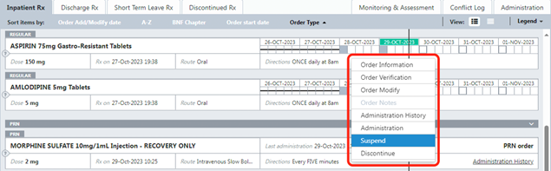
Right click on the drug and choose Suspend.
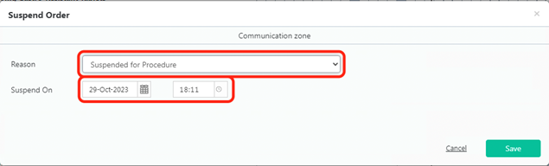
Choose a Reason for suspension and make sure the Suspend On time is after the last dose you want given and before the dose you want missed.
The drug will show as Suspended on Inpatient Rx.
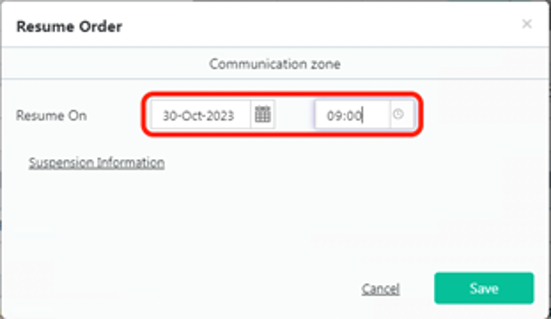
Right click and choose Resume.
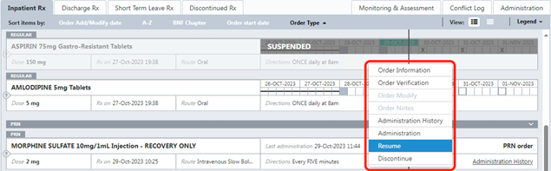
Choose a Resume On time after the time of the dose you want to omit.
The drug will now show as suspended and there will be an X in the box corresponding to the dose that will be missed.
Once the Resume On time has been reached, the drug will automatically resume.



 Grampian anaesthesia toolkit [in development]