Warning

Protocols

Drugs are prescribed by the type of preparation, e.g., Paracetamol caplets, solution or infusion. Caplets and solution can only be prescribed for oral use and infusion can only be prescribed for IV use.

Protocols enable different drug preparations or different drugs to be grouped together.

  • Normal protocols allow a group of drugs to be prescribed in one go, for example post-operative analgesia and antiemetics. Individual drugs can be removed before prescribing if they are not appropriate.
  • Either/or protocols generally group different drug preparations together, for example the oral, IV and IM routes of Cyclizine.
  • Single selection protocols group together commonly prescribed drugs and allow one choice from the list, for example, opioids for PACU.

There are some useful protocols in HEPMA to make prescribing quicker. They should be used as the first choice to enable prescribing of multiple preparations and routes.

Normal Protocols

  • Post-op Mild to Moderate Pain
    • Paracetamol (IV/Oral), Ibuprofen, Dihydrocodeine (Regular & PRN), Prochlorperazine (Buccal/IM), Ondansetron (IV/Oral), Cyclizine (IV/Oral).
  • Post-Op Severe to Excruciating Pain
    • Paracetamol (IV/Oral), Ibuprofen, Morphine (Regular & PRN), Prochlorperazine (Buccal/IM), Ondansetron (IV/Oral), Cyclizine (IV/Oral).
  • Dihydrocodeine
    • Prescribes Regular and PRN with an appropriate max dose in the PRN
      notes.
  • Morphine
    • Prescribes Regular and PRN.
  • Triple Therapy Antiemetic
  • Cyclizine (IV/Oral), Ondansetron (IV/Oral), Prochlorperazine (Buccal/IM).


Either/or Protocols

  • Paracetamol (IV/Oral)
  • Cyclizine (IV/Oral)
  • Prochlorperazine (Buccal/IM)
  • Ondansetron (IV/Oral)


Single Selection Protocols

  • PACU Analgesia
    • Morphine, Oxycodone, Alfentanil/Morphine, Fentanyl, Tramadol for titration.
  • PCAs & Infusions
    • Morphine, Oxycodone, Fentanyl, PCAs, and Ketamine, Levobupivacaine, Metaraminol infusions.

Protocol search

To search for a protocol, click on Add Drug from the Inpatient Rx tab.

Screen shot from HEPMA

Click on the Protocol tab.

Type the first part of the protocol name in the search box and click search. You don’t have to type the full protocol name.

HEPMA screen shot

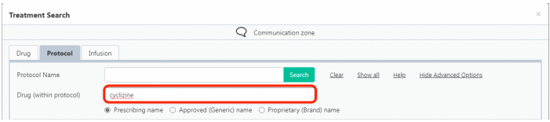
You can also click on More search options and search for a drug within a protocol.

HEPMA screenshot

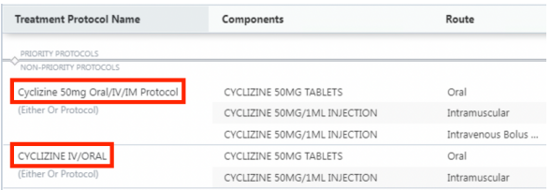
Click on a protocol name to select and review the dose and frequency.

HEPMA screenshot

Selecting the protocol

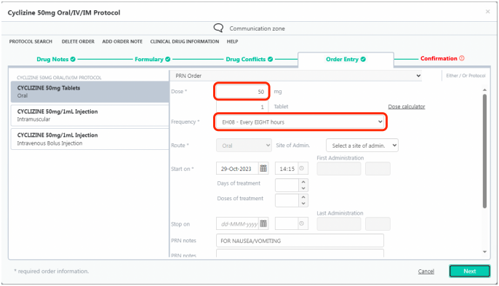
Different doses can be chosen for each preparation of an Either/Or Protocol, but the frequency will be the same.

HEPMA screenshot

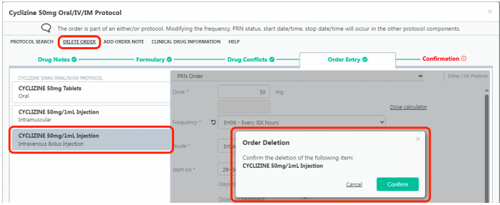
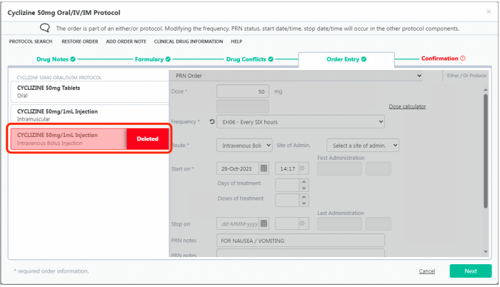
If you don’t want to prescribe a certain drug or preparation in a protocol, select the relevant component, click on Delete Order, then confirm order deletion.

HEPMA screenshot

The component will show as deleted and you can proceed to completing the prescription on the Confirmation tab.

HEPMA screenshot

Drugs not in a protocol

The other common drugs prescribed for post-operative use are prescribed as single preparations.

On the Inpatient Rx tab, click on Add Drug.

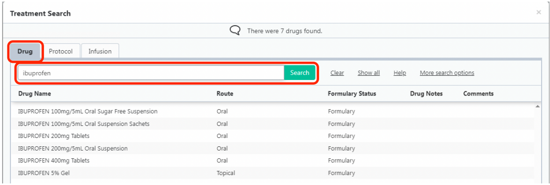
Stay in the Drug tab, search for the drug in the search box, and choose the preparation.

HEPMA screen shot


Regular Prescriptions

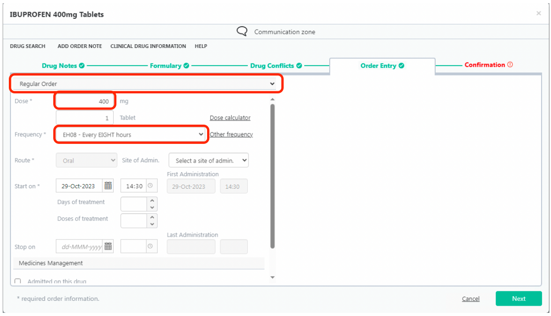
On the Order Entry tab, make sure a Regular Order is selected at the top.

Check the Dose.

In the Frequency field, it may default to a regular ‘x’ hourly frequency. In the example below, this would prescribe Ibuprofen at 8 hourly intervals at 0630, 1430 and 2230.

HEPMA screen shot

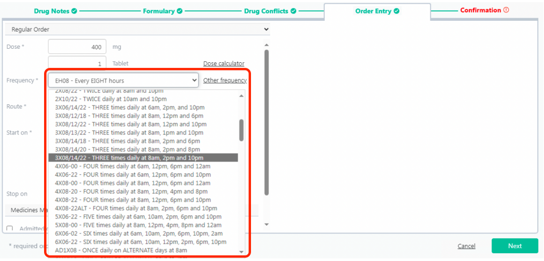
If you want to prescribe for more traditional times, click on the Frequency box and choose a regular frequency with specific times.

HEPMA Screenshot

Click on Next to go to the Confirmation tab to confirm the prescription.


PRN Prescriptions

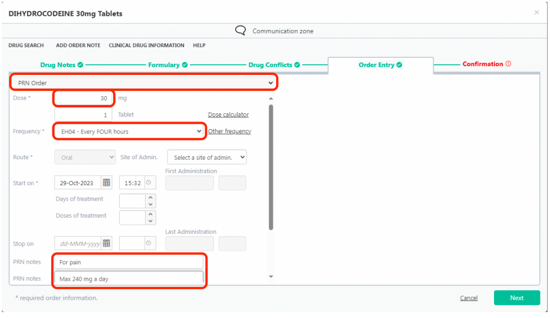
On the Order Entry tab, make sure a PRN Order is selected at the top.

Check the Dose and Frequency fields.

Check the PRN notes and add in a maximum dose if preferred.

HEPMA Screenshot


Once Only or STAT Prescriptions

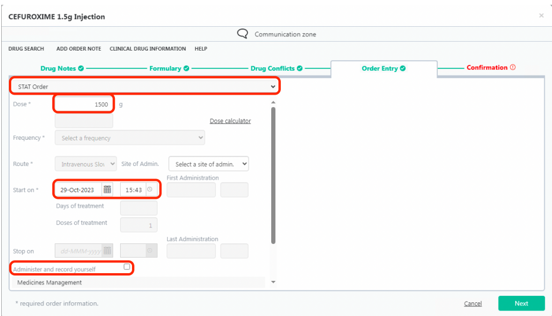
On the Order Entry tab, make sure a STAT Order is selected at the top.

Check the Dose and Start on fields.

If you are recording a drug you have just administered, tick the box Administer and record yourself. The Start on time will default to the current time when this box is ticked.

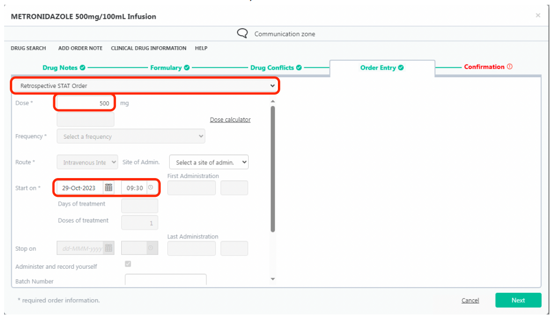
To record a STAT administration from the past, use a Retrospective STAT prescription.

HEPMA screenshot


Retrospective STAT Prescriptions

On the Order Entry tab, make sure a Retrospective STAT Order is selected at the top.

Check the Dose and Start on fields; choose a time from ten minutes to 24 hours earlier.

HEPMA screenshot


Regular and Associated PRN Prescriptions

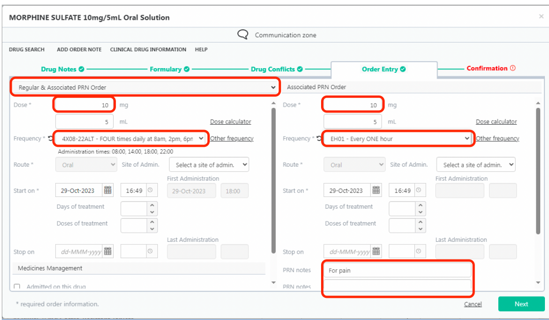
A regular and associated PRN prescription of the same drug can be created together, for example regular oral morphine and additional PRN doses.

When choosing Regular & Associated PRN Order type, the regular prescription is on the left and the PRN one is on the right.

Check the Dose and Frequency on both sides and add any PRN notes.

This will prescribe a separate regular and PRN prescription on the Inpatient Rx tab.

HEPMA Screenshot

Editorial Information

Last reviewed: 01/11/2023

Next review date: 01/12/2026

Reviewer name(s): Calum McDonald.