Grampian anaesthesia toolkit [in development]
Type ‘paed’ or ‘paediatric’ into Protocol search box
Three protocols will appear – sedative premeds, analgesic premeds, and a post-op panel.
Click on the one you want and follow the steps.
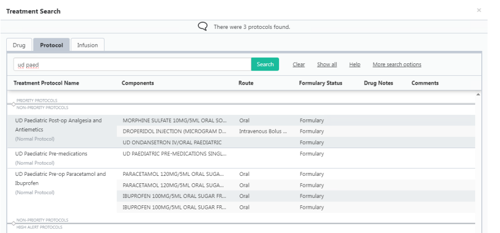

Type ‘paed’ or ‘paediatric’ into Protocol search box
Three protocols will appear – sedative premeds, analgesic premeds, and a post-op panel.
Click on the one you want and follow the steps.
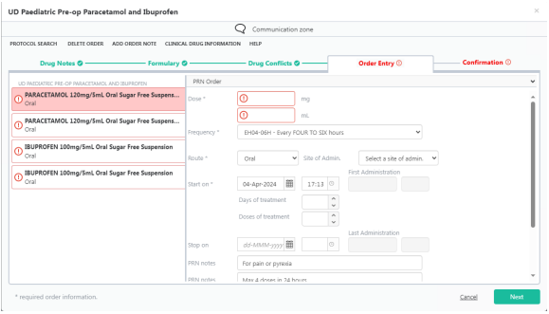
4 drug entries can be prescribed together. They are for paired STAT/PRN prescriptions for paracetamol & ibuprofen. All 4 must be filled out to continue, or you can delete the entries you don’t want.
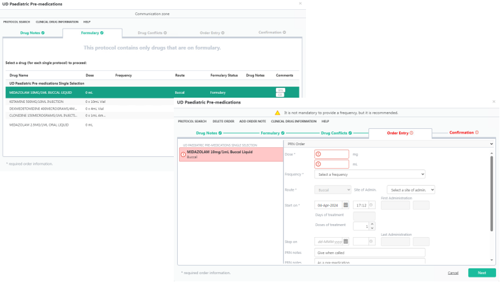
On selection of protocol, choose the premed you wish to prescribe by clicking on it under the ‘Formulary’ tab (green highlight) and proceed ‘next’
Continue as usual to populate desired dose – note that it is prescribed ‘PRN, on call’ and will expire after 1 dose is administered.
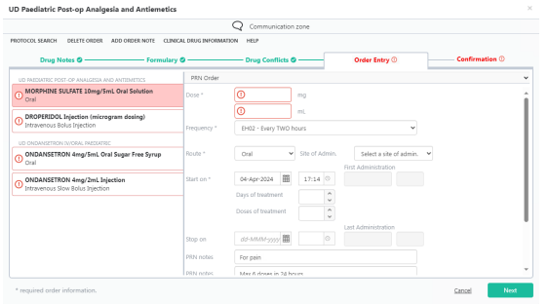
3 common post-op prescriptions have been grouped together for ease – simply fill out the ones you want and delete the ones you don’t want.
Ondansetron exists as an ‘either/or’ allowing administration as IV or oral.