Warning

Once only pre-operative medications should be prescribed on HEPMA for nursing staff to give. There are two ways to prescribe these, with the second way being important if you want to delay administration until you call from theatre.

When prescribed, remember to tell the nursing staff you have done so and when they
have been prescribed for.

STAT doses

STAT doses need to be prescribed for a time in the future.

Administration can be recorded from one hour before the prescribed time until four hours after the prescribed time.

STAT doses appear in the Regular tab of the Administration screen.

Prescribe in the usual way, from the Inpatient Rx tab, click on Add Drug and search for
the drug to be prescribed.
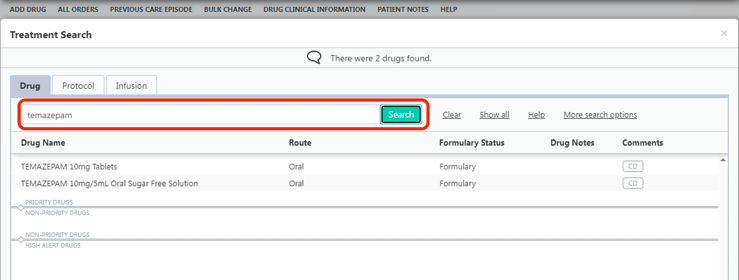
HEPMA stat dose Screen shot

In the Order Entry tab, the prescription usually defaults to PRN, so change it to STAT.
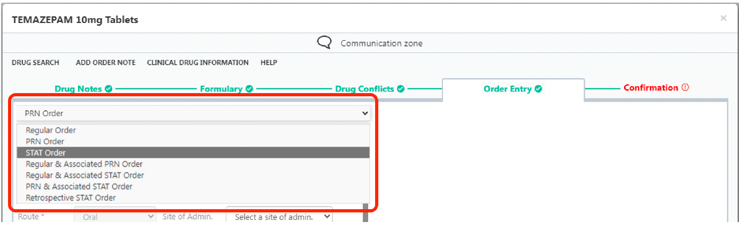
HEPMA stat dose order entry screen shot

Choose the Dose and Start on date and time. You can select the date and time by clicking on the calendar and clock icons beside the fields. You can also click on the hours and minutes and type in for a more specific time.

Confirm on the Confirmation tab to complete the prescription.
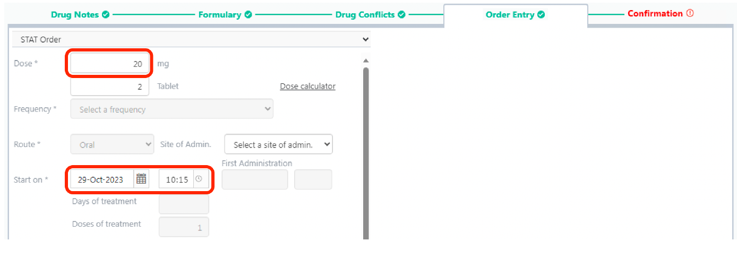
HEPMA stat dose and start screenshot

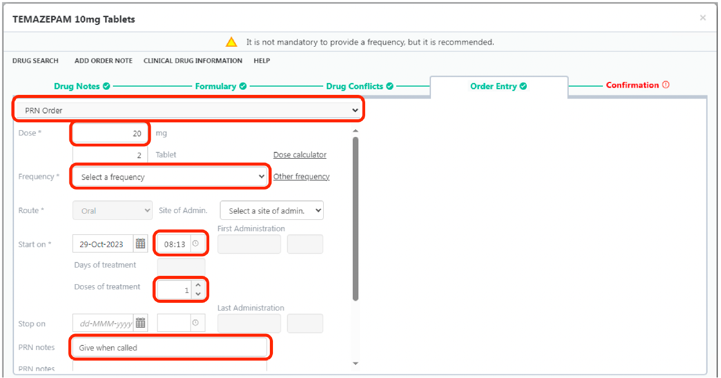
PRN dose with one administration

Use this if you want to prescribe a once only drug but leave the time of administration open i.e. so that you will call from theatre when you want the drug administered.

Search for the drug in the usual way and prescribe as below on the Order Entry tab.

Confirm it is a PRN Order and change the Dose if necessary.

Check the Frequency is Select a frequency option rather than a specific time.

Leave the time but change the Doses of treatment to 1.

Change the PRN notes to indicate that you will call for administration.

After one administration, no more administrations will be possible.

HEPMA PRN dose screenshot

Editorial Information

Last reviewed: 01/11/2023

Next review date: 01/12/2026

Reviewer name(s): Calum McDonald.